What's new
See the latest improvements and product updates.
Fill out cost items, hours, and invoices with AI
October 13, 2026
💶 Import cost items from a file
Drop a file (such as a PDF, Word document, Excel sheet, or image) on the cost items section in a case, and Endre AI will read the description, quantity, unit, and unit price of each line. You can check what was found in a review before anything is added to the case.
⏱️ Import hours from a file
Hours, too, can now be read from timesheets. Drop them on the hours section in a case, and Endre AI will match each line to a resource from your project.
🧾 Import invoices from files
Drop invoice files on the invoice section in a case, and Endre AI will create one invoice for each file with the invoice number, the amount excluding VAT, and the invoicing and due dates.
🗂️ Hours are available on more case types
Hours can now be submitted and processed on claims, counterclaims, price requests, and change orders. You can also add them to any custom case type that you create.
Register and report on hours in Endre
October 5, 2026
⏱️ Register hours in Endre cases
Hours can now be included as an additional section on any new or existing case type. Add the resources that carried out the work, then enter their hours per day or per week. Prices are calculated from the contract rates.
✅ Process hours week by week
When replying to a case with hours, it is possible to approve or reject the hours one week at a time. Each week gets its own status, so you can see what has been handled and what is still waiting.
📊 Reporting on hours in one overview
A new hours table shows every hour registered across your cases in a weekly or monthly view. You can narrow it down to a specific period and view summed totals for reporting.
📄 A new look for case PDFs
Cases exported to PDF have been redesigned to be cleaner and easier to read.
Improved tracking of drafts and approvals
August 21, 2026
🔄 Keep track of changes to approved cost items
When a cost item or deadline extension is edited after it has been approved, the previously approved amount is now preserved and shown alongside the new total.
📋 Find your drafts faster
Drafts for case replies and new case versions can now be filtered on using the "Draft" status in the case list. They also appear in the "Drafts" space, making it easy to pick up where you left off.
📐 New case property types
Two new types of custom case properties are now available. Formula lets you build computed fields that reference case financials, contract values, or other custom properties. Long text adds a rich text field.
🧮 Add custom columns to your cost items
You can now define your own columns on the cost item table. These can be of types text, amount, date, or formula.
A new look for Endre
July 9, 2026
The interface has been redesigned to feel cleaner and easier to navigate.
🔗 Relations and properties at a glance
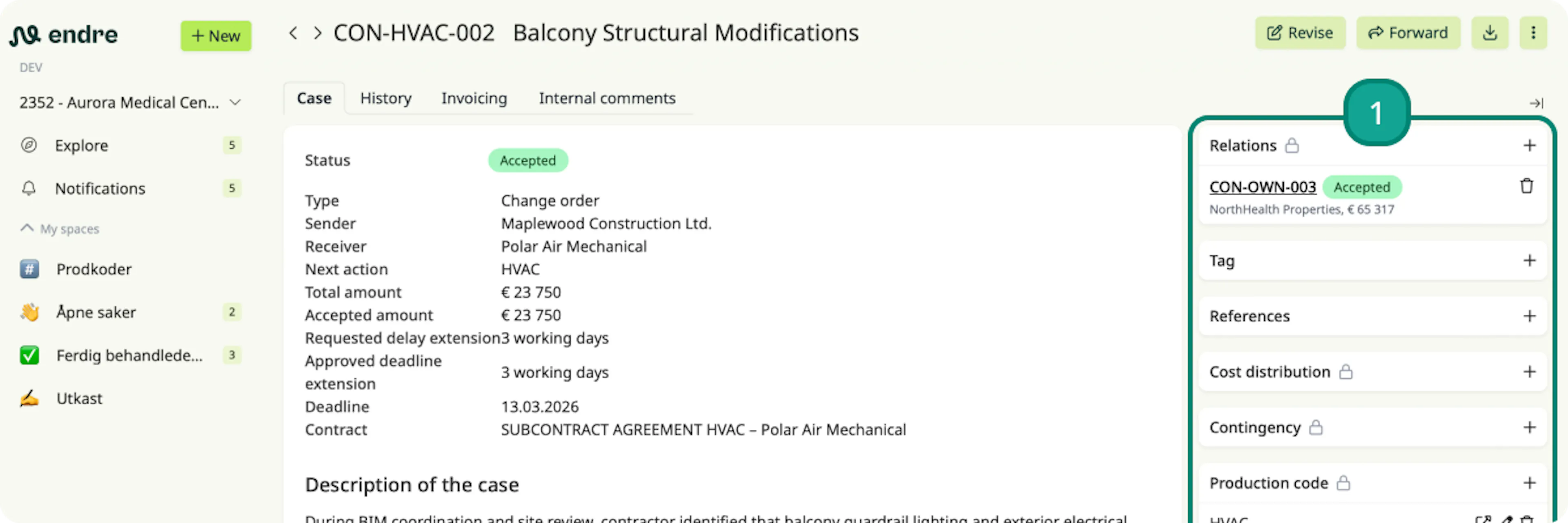
Relations, tags, production codes, and other properties are all easier to find by being placed at the top of the case page 1. For example, you can now quickly glance between the case content and its related cases.
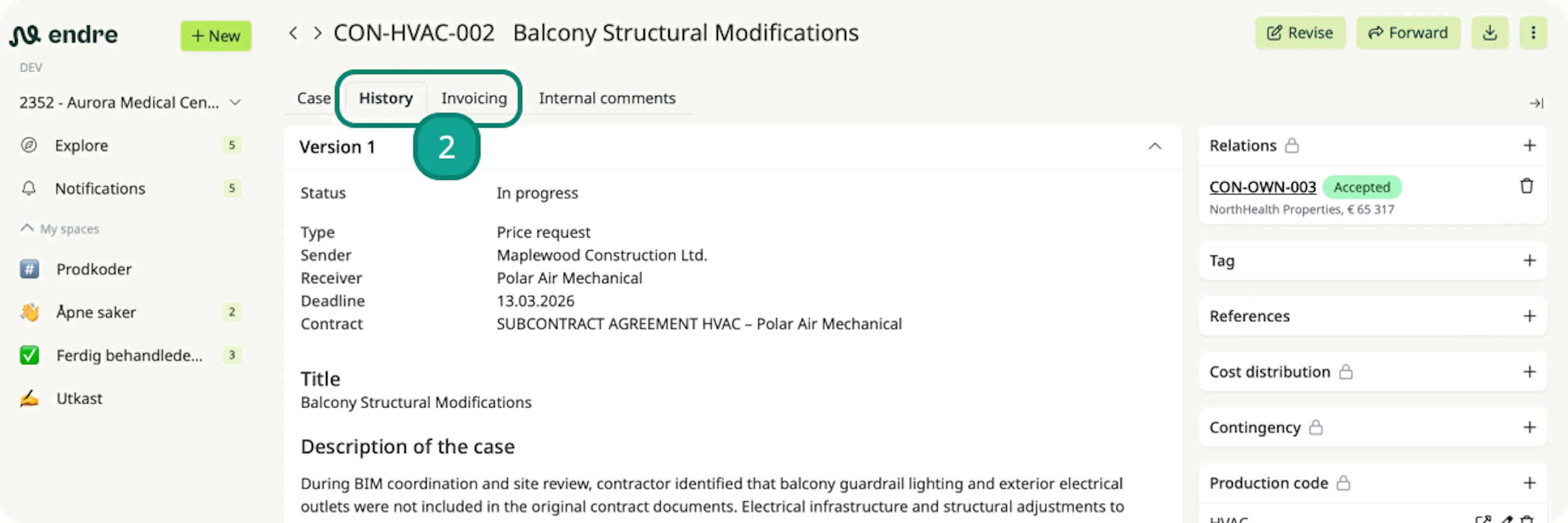
📋 History and invoicing in the case header
Case history and invoicing are also easier to access directly from the case header 2. You can then review and compare previous case versions without navigating away from the case.
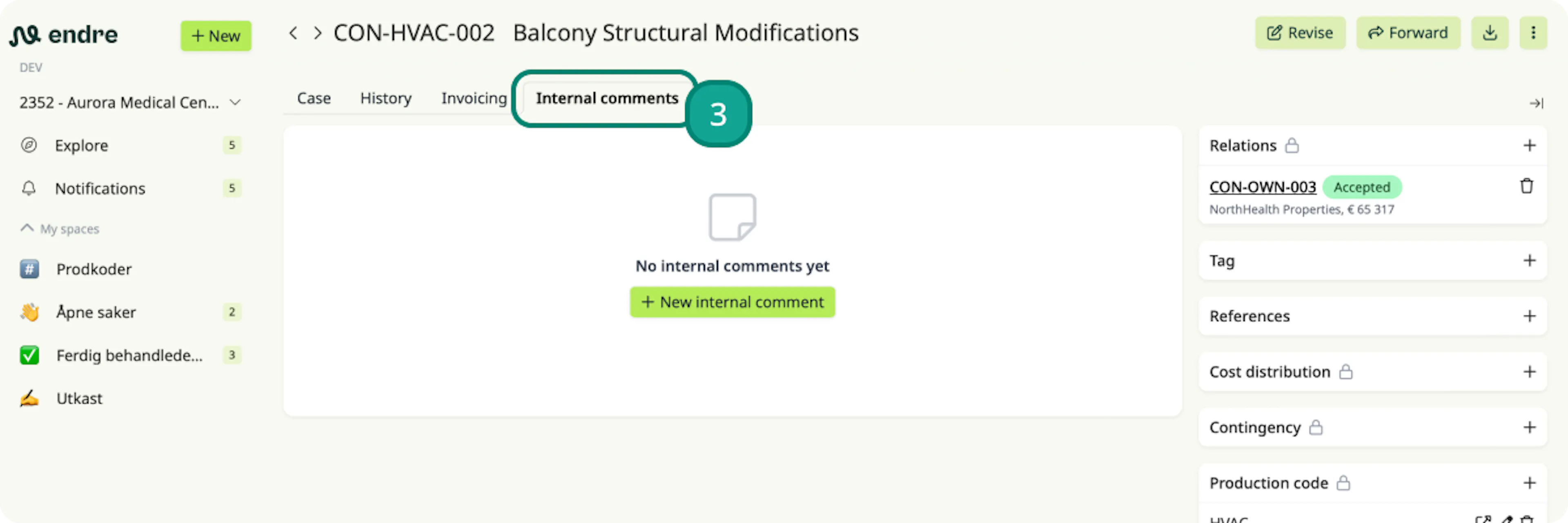
💬 Internal notes → Internal comments
Internal notes have been renamed to internal comments and given more space 3. The expanded view makes it easier to write, read, and keep track of what's been said internally.
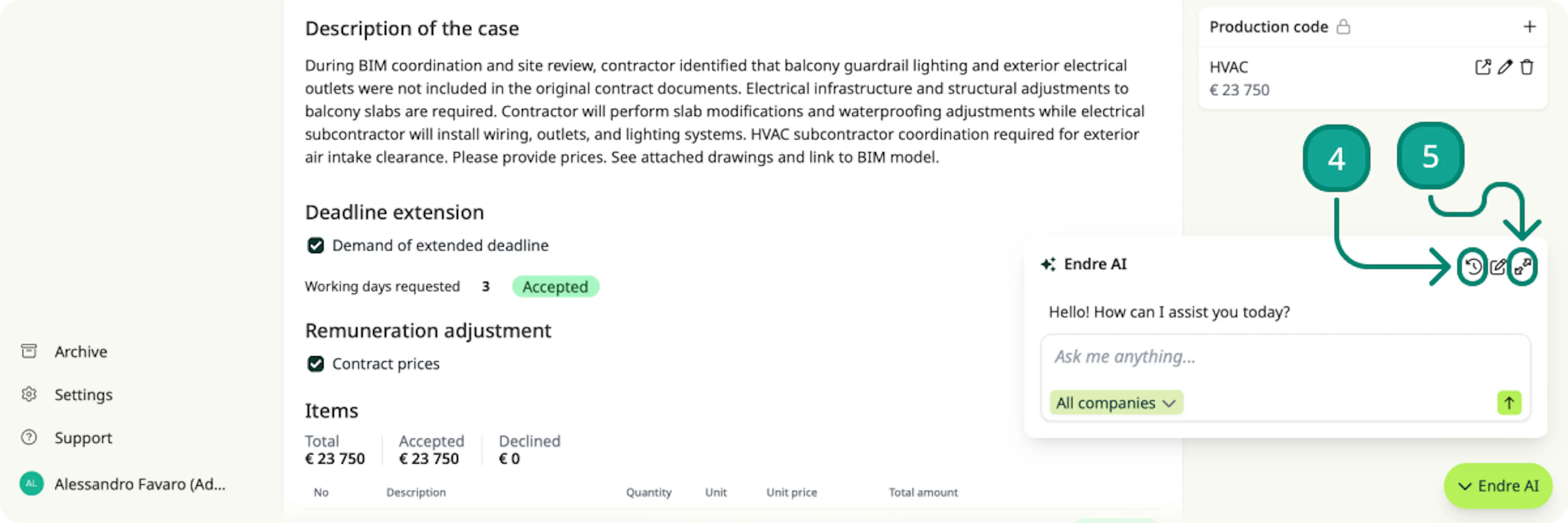
🤖 AI conversations in context
Previous AI conversations can now be accessed directly from the Endre AI chatbot without leaving your current page 4. The chatbot itself can now be expanded, giving you more space to work with 5.
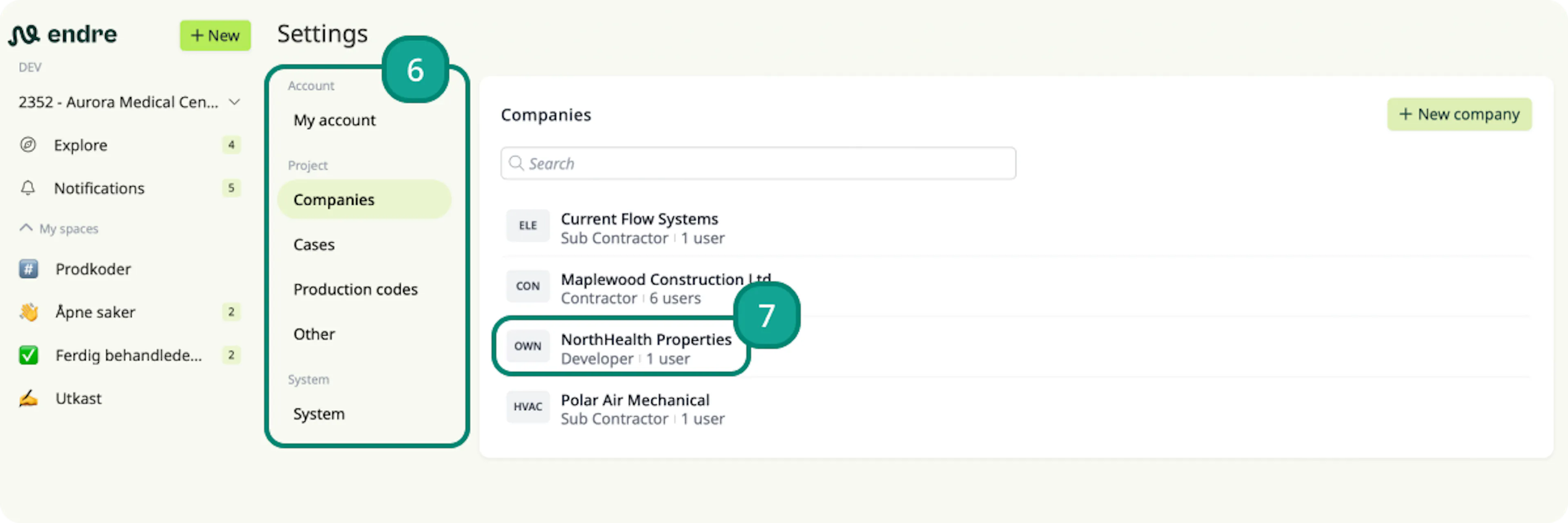
⚙️ Settings reorganised into subpages
Settings have been reorganised into dedicated subpages, so you no longer need to scroll through a single long list 6. Users, contracts, and rates are now grouped by company, making it much faster to set up each company 7.
Shared spaces, custom case fields and more
June 17, 2026
🗂️ Share spaces with your team
Spaces can now be shared with your company, either within a single project or across all projects.
📄 Add custom fields in the case form
Additional sections can now be added to the case form for specific case types, allowing you or the counterparty to fill in additional relevant information when sending a case.
🔄 Stay on top of updated cost items
When a cost item linked to a forwarded case receives a new version on the sender side, an "Updated" badge now appears showing exactly what changed. You can then apply the update to your cost items in a single click.
📥 Forward related attachments faster
Attachments from the source case can now be found and linked directly on forwarded cost items via the "More actions" button. You can also import the source case itself as an attachment from the same menu.
📊 Import production codes from Excel
Do you have a standard set of production codes that you reuse across projects? You can now import them directly from a spreadsheet.
⬅️➡️ Navigate between cases without going back to the case list
Two arrows next to the case title let you jump to the previous or next case in the same series against the same counterpart.
Improvements to attachments and custom case properties
May 29, 2026
📎 Connect attachments directly to cost items
You can now attach timesheets, photos, or other supporting documentation directly to the cost item that they refer to. To do that, click on the “More actions” button on the cost items.
📬 Easily forward new case attachments
Once you forward a case that you have received, you can now also forward any new attachments that the counterpart may add later by clicking on the “Import attachments” button.
👁️ Preview more file types directly in Endre
The file preview now supports Word documents and Excel spreadsheets, in addition to PDFs and images. No need to download files to view them.
🏷️ Add custom properties to cases
Project administrators can define additional properties to be filled in on cases. These properties can then be displayed as columns in the case list and used to filter and sort cases.
➡️ Clearer button for forwarding cases
The “Copy case” button has been replaced with a more visible “Forward” button.
Tagging users and partial approval of items
March 10, 2026
💬 Collaboration with colleagues and counterparties is now more structured. You can tag users directly in a case by typing @ in a message or note. Then select the user you want to mention. The tagged user will receive a notification.
❓ It is not always appropriate to approve or reject an item in full. If you click “More” when processing an item, you can approve only part of it. You can choose a portion of the quantity or part of the unit price. You can also request a new price for the item.
Export all cases in your project
January 29, 2026
You can now export as many cases as you want to PDF at the same time. Simply select the cases you want to export and click the export button, where you can choose between Excel and PDF.
💡 Tip: You can export the entire project by selecting all cases at once.
New case capabilities and clearer financial overview
January 14, 2026
🆕 New case type
Counterclaims can now be sent downstream to subcontractors.
📈 Improved financial overview
VAT and accruals can now be displayed in the amounts in case lists. These can be enabled in the Settings menu at the top right in Explore and Areas.
✅ More flexible case handling
- Cases can be responded to in multiple steps, so everything doesn’t have to be processed at once.
- Text in items can be copied to Excel and other tools.
- Deadline extensions can be partially approved.
New views and customised PDF export
December 11, 2026
Case lists in Explore and Spaces have a new design, and you can now choose whether to view cases or items within cases. This is done via “Settings” in the top right.
To gain better financial insight, you can now:
- Track costs and revenues per production code
- View site overhead and operations across the entire project
- Get a clearer overview through production codes for each contract
The PDF export has also been updated so you can easily customise what you download. For example, you can:
- Export the latest case version, multiple versions, or all versions
- Include attachments in the export
- Show or hide the status for each item
- Add a signature field in the PDF for completion
The Endre knowledge base is launched
September 29, 2025
We’ve added a new knowledge base in Endre. Here you’ll find guides to help you get started and make the most of Endre. You’ll also find information on how to contact us if you need assistance. The knowledge base is available via the Help button at the bottom of the side menu.
Additional improvements:
📃 Contract sharing – contracts can now be shared with counterparties, allowing both parties to create cases linked to the same contract.
✍️ Draft deletion – you can now delete drafts of responses or new revisions in a case.
⚙️ Settings gathered in one place – a more structured and intuitive experience.
One-click PDF export, index adjustment, and read-only access
September 8, 2025
🗂️ It is now easier to export a case with all attachments to PDF with a single click via “Export” under More actions.
💰 Index adjustment can now be automatically calculated for invoices/cases based on the selected Statistics Norway (SSB) index and relevant start date.
👋 Want to invite users who need visibility into what’s happening in Endre, but shouldn’t create or respond to cases? You can now invite them as readers.
Getting started with Endre is now easier
August 6, 2025
We’ve made onboarding easier for both new users and project administrators:
🧭 Guided registration of your user account.
💡 Faster and more intuitive way to invite companies and users to your project.
⚙️ All settings are now gathered in one place.
❓ Need help? You can now find it directly in the side menu.
Easier case response
July 11, 2025
The response form has been simplified for all case types. To respond:
- Select the status for items, deadline extension, or the entire case
- Optionally add a justification or attachments (optional when approving)
- Click “Send” to submit your response
Technical clarifications have also been improved. Both parties can now respond, mark as clarified, or set the status to “Waiting for third party.”
Improvements in invoicing, tags, and markups
June 6, 2025
- You can now add a billing schedule at the case level and share it with the counterparty.
- Tags can be made visible to the counterparty or kept internal. This allows cases to be categorized and filtered consistently for both sender and receiver, if desired.
- Markups can be shown or hidden in PDF exports.
Attachments can be previewed
May 8, 2025
- PDFs and images now have a simple preview directly in Endre.
- Invoices now show both paid and outstanding amounts. Outstanding amounts are calculated automatically based on payments. Both fields can be displayed as columns in case lists and areas.
- The timeline has been condensed and shows more messages in the same space.
- The “History / Export” view has been cleaned up.