Get started with Endre
Learn how to use Endre effectively with walkthroughs of features and best practices.
Endre is a change management tool where project parties collaborate on documentation, financial impact, and approval of notices, claims, and change orders.
Here you will find guidance on how to get the most out of Endre, whether you are a contractor, owner, consultant, or subcontractor.
Welcome to your project
In Endre, everything is organized into projects. Each contract change is a case sent from one company to another in the project.
As a user, you are added to a company in a project, and you get access to all cases your company has sent as well as all cases your company has received in this project.
👉 Good to know: You may be invited to multiple projects. You can switch between your projects in the sidebar.
Explore cases
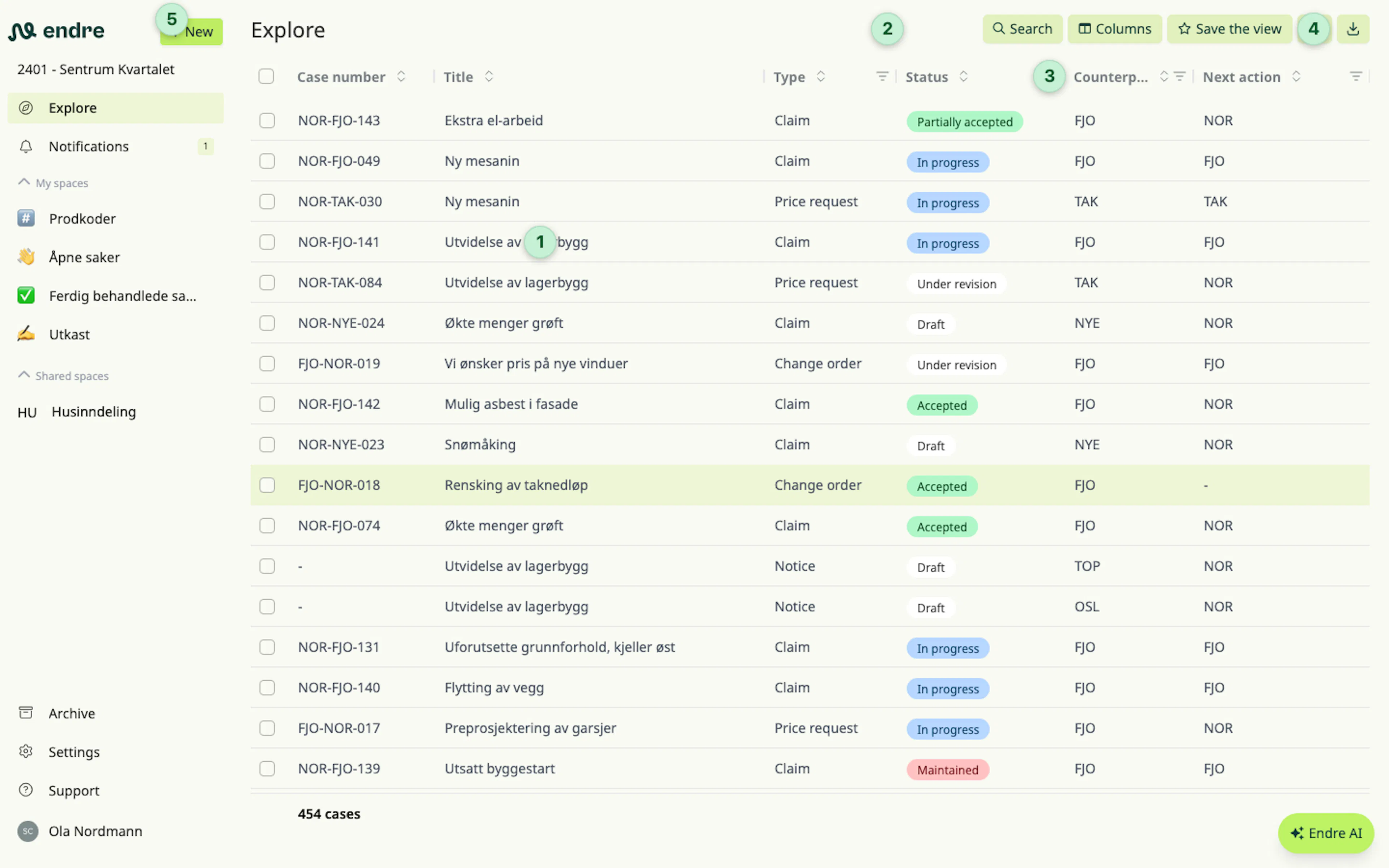
When you first open Endre, you will see all cases in the project on the Explore page. Click on a case 1 to see more details, edit, or reply.
To find a case, you can search 2 or filter by any column 3.
New and unread cases, or existing cases with unread changes (such as a reply or a new version), are shown in bold. Click here 4 to show only unread cases.
To create your first case, click New in the sidebar 5.
👉 Good to know: Your project may not have any cases yet. In that situation the page will appear empty.
Case types
In Endre you can send and receive several case types:
- Notice
- Claim
- Price request
- Change order
- Technical clarification
It is easy to change the case type later, for example to update a notice to a claim.
👉 Good to know: Approved requests for quotation are automatically converted into change orders.
Case statuses
Cases in Endre move through several statuses. These are managed automatically by the case flow, based on what the sender and the counterparty do:
- All newly created cases start as draft and are visible only to the sender.
- When a draft is actually sent to the counterparty, it gets the status new.
- When the counterparty opens the case, it is marked in progress.
- When the counterparty replies, the case becomes approved, rejected or partially approved.
- It is also possible to mark that the counterparty is waiting on a third party before they can reply.
- If the sender disagrees with the handling, the case can be maintained to ask the counterparty to reconsider it.
- If the parties still disagree, the case can be marked as disputed.
- It is possible to mark rejected cases as expired.
👉 Good to know: It is not possible to delete cases in Endre, but both drafts and cases marked as expired can be moved to the archive.
Participants
All parties in the project can get started in Endre:
- As a contractor you can collaborate with the owner, consultants, and subcontractors.
- As an owner you can collaborate with the contractor and consultants.
- As a subcontractor you can collaborate with the contractor and consultants.
👉 Good to know: Endre works best when all parties are invited into the solution. But it is also easy to create and complete cases against a company that does not get started.